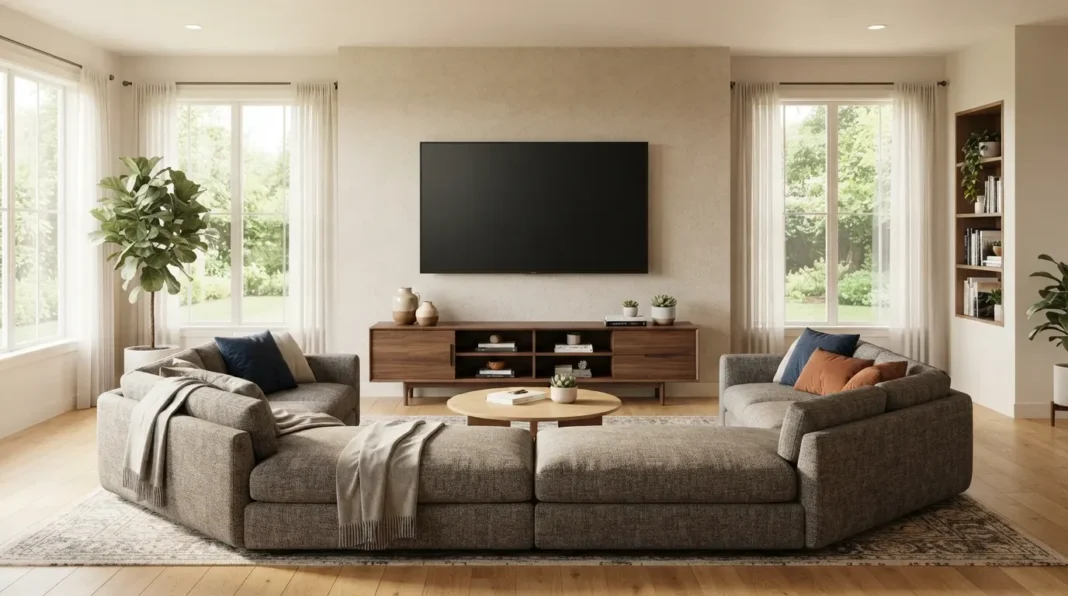
Place TV Living Room Screens at the Right Height First
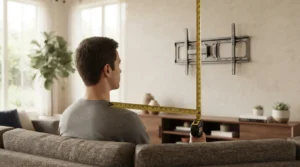
You can place tv living room setups correctly by mounting the screen so its center lands at seated eye level, then working backward from there to pick the mounting style, the distance, and the cord management that fit the room. Getting this one measurement right before anything else avoids nearly every common TV placement complaint.
KEY TAKEAWAYS
- Center the screen at seated eye level, not standing eye level, since most viewing happens sitting down.
- SMPTE’s viewing angle guideline suggests a distance of roughly twice the screen’s width for a comfortable, immersive picture.
- Mounting above a fireplace usually means going higher than ideal eye level, so a tilting bracket helps compensate.
- Corner placement works only when no other wall gives every seat a reasonable sightline.
- Cord covers and swivel mounts are finishing touches, not fixes for a badly chosen height or distance.
Most TV placement mistakes trace back to the same root cause: mounting the screen based on wall space instead of where people are actually sitting. A TV that’s technically visible but mounted too high or placed too close still ends up uncomfortable to watch for more than a few minutes at a time. The seven ideas below fix that by treating eye level and viewing distance as the starting point, the same anchor-first thinking already covered in how to arrange small living room furniture more broadly.
7 Ideas for Where to Place a TV in the Living Room
Each idea below solves a different piece of the placement puzzle for anyone trying to place tv living room screens correctly, from the core height measurement to the finishing details like cord management.
Work through them roughly in order, since the height and distance decisions in the first few ideas shape which of the later options actually make sense.
Measure Eye Level From the Main Seat First
Before mounting anything, sit in the main seating spot and measure the height from the floor to eye level while seated, typically somewhere between 40 and 44 inches depending on the couch and the person. The center of the TV screen should land at or close to that number, not several inches above it.
This single measurement prevents the most common placement mistake: a TV mounted too high because it was centered on a wall or a fireplace opening instead of on the actual seated sightline. Skipping this step is why so many TVs end up requiring a slight neck tilt during every viewing session.
Mount Above a Fireplace Only With a Tilting Bracket
Mounting a TV above a fireplace is common but almost always puts the screen higher than ideal eye level, since fireplace mantels rarely line up with a seated sightline. A full-motion or tilting mount angled downward toward the seating area compensates for the extra height and reduces the neck strain a fixed mount would cause at that position.
This fix costs more than a basic fixed mount, typically $30 to $50 for a quality tilting bracket, but it’s meaningfully cheaper than moving the TV to a different wall entirely. Anyone mounting above a fireplace should plan on this bracket type from the start rather than upgrading later.
Use a TV Stand Instead of Wall Mounting in a Rental
A stand-mounted TV skips drilling into a rental’s walls entirely while still allowing height adjustment through stand selection or a small platform riser. This option works especially well when the ideal wall for eye level happens to be one a landlord won’t allow mounting hardware on.
Stands in the $30 to $50 range typically include at least one shelf for a streaming device or soundbar, adding function beyond just height. This is also the easiest option to reposition later if the seating arrangement changes, since nothing is permanently attached to the wall.
Calculate the Right Viewing Distance for Screen Size
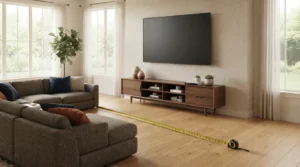
Once height is settled, viewing distance decides whether the picture actually feels comfortable rather than too close or too far away. A screen that’s technically at the right height can still strain the eyes or fail to immerse if the distance from the main seat doesn’t match the screen’s size.
SMPTE’s engineering guideline for viewing angle suggests sitting at roughly twice the screen’s width for a comfortable, cinematic field of view, a distance that scales up or down depending on how large the screen actually is. The table below details viewing distance guidelines established by SMPTE specialists.
| Insight | Source | Team |
|---|---|---|
| Beyond the basic 2x-width distance rule, SMPTE’s guideline is built around a 30-degree horizontal viewing angle measured from the main seat, meaning the “right” distance actually shifts with screen width rather than staying fixed at one number for every TV size. | SMPTE | SMPTE Standards Committee |
Avoid Corner Placement Unless the Room Forces It
Placing a TV in a corner usually creates an awkward viewing angle for any seating that isn’t directly facing that corner, which matters most in living rooms with multiple seating pieces angled toward each other. This placement should be a last resort used only when no other wall in the room offers a reasonable sightline for the main seating.
When a corner truly is the only option, a swivel mount helps compensate by letting the screen angle toward whichever seat is in use, though it still won’t serve two very differently angled seats equally well at the same time. Testing the sightline from every seat before committing to a corner placement saves a difficult correction later.
Hide Cords With a Cord Cover Channel
A paintable cord cover channel run from the TV down to the outlet keeps a wall-mounted setup looking finished rather than draped in visible cables. Basic channel kits typically cost $15 to $25 and can be painted to match the wall for a nearly invisible result.
This fix matters more for wall-mounted TVs than stand-mounted ones, since a stand usually has the outlet close enough that cord length isn’t a visible problem. It’s worth adding once the mount height and position are finalized, not before, since moving the TV later means redoing the channel too.
Add a Swivel Mount for Multi-Seating Rooms
A swivel mount lets the screen rotate toward whichever seating area is actually in use, which helps in living rooms with seating on two different walls or an L-shaped sectional facing more than one direction. This solves the sightline problem a fixed mount creates when the “ideal” angle only really works for one seat.
Swivel mounts typically cost more than fixed brackets, often landing at the higher end of a $50 budget or slightly above depending on the screen size and arm length. This upgrade makes the most sense in rooms where Idea 5’s corner-placement problem can’t be avoided entirely.
3 Signs Your TV Is Mounted Too High
A TV is mounted too high when watching for more than a few minutes causes a noticeable neck ache, when the bottom of the screen still sits above seated eye level, or when the mount was centered on a fireplace opening instead of the actual seating sightline. Any one of these three signs usually means the TV needs to come down several inches, not just tilt further forward.
Most people notice the neck ache first, since it’s the most immediate physical feedback. That specific complaint is almost always solved by remeasuring seated eye level, Idea 1 on this list, rather than by adjusting the tilt angle alone.
Cheapest Way to Fix TV Placement Under $50
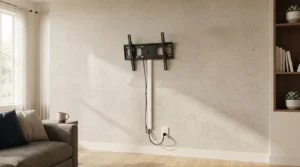
Swapping a fixed mount for a basic tilting bracket, often $20 to $35, is usually the cheapest fix for a TV that’s mounted too high, since it lets the screen angle down toward the seating without moving the mount itself. A simple stand riser or a stack of sturdy books can achieve a similar effect for TVs on a stand rather than the wall.
Adding a $15 to $20 cord cover channel alongside the tilting bracket keeps the whole setup under $50 while addressing both the height angle and the visible cable problem at once. This combination handles the two most common complaints without needing to remount the TV on a different wall.
Best TV Placement Setup for 2026 (Editor’s Pick)
For most people trying to place tv living room screens in 2026, a fixed-height wall mount set precisely to seated eye level, paired with a viewing distance calculated from the screen’s actual width, remains the strongest overall setup. This combination requires no ongoing adjustment and works well in rooms with one clearly defined main seating area.
For rooms with multiple seating zones facing different directions, a swivel mount is the better upgrade despite the higher cost, since it solves the sightline problem a fixed mount can’t address once seating gets added on a second wall. Either setup outperforms placing the TV based on wall space alone without checking eye level first.
A TV That Finally Feels Comfortable to Watch
Measure eye level from the main seat before choosing a mounting style or a wall, since that single number determines whether a fireplace mount, a stand, or a swivel bracket makes sense for the room. Add cord management and multi-seat adjustments only once the core height and distance are settled.
This same eye-level-first approach works whether the room has one main seat or several angled around a sectional, and it holds up whether the TV goes above a fireplace, on a simple stand, or on a swivel arm in the corner. A TV placed correctly disappears into the room when it’s off and feels effortless to watch when it’s on, which is the entire goal. Try measuring your own seated eye level this week before moving anything, then tell us whether the height or the distance was further off than expected.
Frequently Asked Questions (FAQs)
Where should you place a TV in a living room?
You place tv living room screens correctly by centering the TV so it lands at seated eye level from the main seating spot, generally 40 to 44 inches off the floor, before deciding on a specific wall or mounting style.
Is it bad to mount a TV above a fireplace?
Mounting a TV above a fireplace often puts the screen above ideal eye level, which can be compensated for with a tilting or full-motion mount angled down toward the seating area.
How far should you sit from the TV?
A commonly cited guideline suggests sitting at roughly twice the screen’s width for a comfortable viewing experience, though the ideal distance scales with the size of the screen.
Should a TV go in the corner of a living room?
Corner placement should generally be a last resort, since it creates an awkward viewing angle for any seating that isn’t directly facing that corner, and it’s best used only when no other wall works.
How do you hide TV cords on a wall-mounted setup?
A paintable cord cover channel run from the TV to the nearest outlet is a low-cost way to hide cables, and it can be painted to match the wall for a nearly invisible finish.